Microsoft has released the first public beta of Windows 11 for Windows Insiders in the Beta channel. The Redmond giant had earlier released the first developer preview of the Windows 11, a few days after the new OS was officially presented.
Microsoft says that the current Windows 11 build in the Beta channel is more stable and closer to the final build than the latest build in the Developer channel that shares the same build number (22000.100).
Beta channel builds are for early adopters and are generally deemed safe enough for use on primary PCs. If you are not very tech-savvy, but are eager to try Windows 11 before it is globally available, the Beta should be a decent bet. It should be noted that the final stable version is expected in late November. If you are planning to install the Windows 11 Beta, do know that there will still be bugs and you should back up important data before you proceed.
How can I install Windows 11 Beta?First, check if you have a compatible PC. Apart from hardware requirements, you can go to Device Manager >> Security Devices and check if you have Trusted Module 2.0 (TPM 2.0).
Also Check: Here's how to bypass the Windows 11 TPM 2.0 requirement and install the OS on an older, unsupported hardware
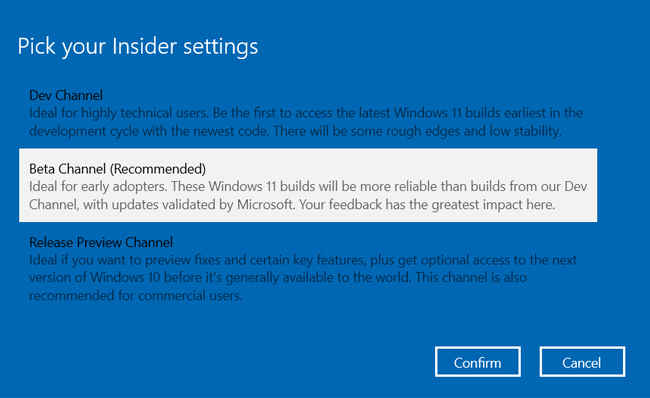
Now, go to Settings, open Update & Security and select Windows Insider Program. Click on ‘Get started’ and link your Microsoft Account. Pick the appropriate channel - Beta in this case.
Restart your computer, and check for updates under Settings >> Update and Security.
That’s it. Just download the Windows 11 Beta and follow the rest of the instructions to complete the installation.
What’s new in Windows 11?Windows 11 brings forth a cleaner Mac-like design with a centrally aligned start menu and taskbar. Users will be able to access widgets and teams app directly from the taskbar. Microsoft has also added some Xbox features like Auto HDR and DirectStorage for PC gamers. There’s also better support for extended monitors, a snap layout for better multitasking, a new action center, and a modern file explorer.
Windows 11 will also get support for Android apps, which users will be able to download via the Amazon App store linked to the Windows store.

from General News https://ift.tt/3zSFG90
Comments
Post a Comment